WhatsApp|9 minutes Read
What ‘Call Not Answered’ Really Means on WhatsApp — And Why It’s Not Always Personal
Ethnickoti

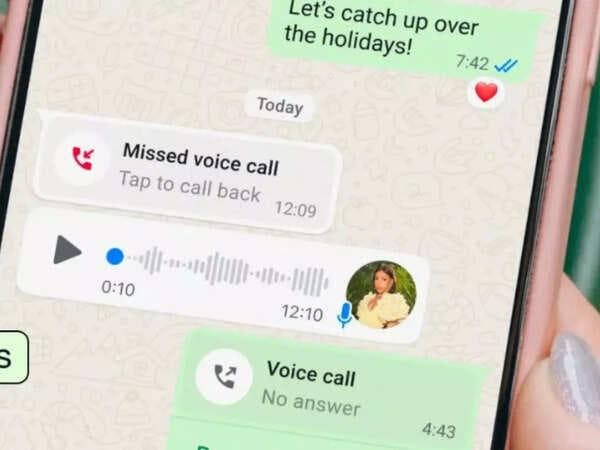
You call someone on WhatsApp. It rings. And rings. Then suddenly the screen shifts to that quietly annoying line: Call Not Answered.
That’s usually the moment people start reading into things. Maybe too much.
Did they ignore the call? Is the phone off? Were you blocked? Did WhatsApp glitch again? The app doesn’t exactly explain itself, and honestly, the wording can feel oddly cold for something so ordinary.
Here’s the simpler reality: most of the time, “Call Not Answered” just means the call reached the other person, but nobody picked it up before it stopped ringing. That’s it. No hidden message buried underneath.
Still, WhatsApp uses several different call statuses, and they all point to slightly different situations. Some are harmless. Some hint at network issues. A couple of them can feel a little suspicious if they happen repeatedly.
So if you’ve been staring at these call messages trying to decode them like a detective, this guide clears things up without the tech jargon spiral.
When WhatsApp says Call Not Answered, the app successfully sent your call to the recipient’s device. Their internet connection was active enough to receive it. The phone rang on their side.
But the call wasn’t accepted.
That doesn’t automatically mean somebody deliberately ignored you. People miss calls constantly for reasons that have nothing to do with the caller.
The phone could’ve been in another room.
Silent mode happens more often than people admit.
Somebody may have been driving.
Weak internet can delay notifications just enough to miss the call window.
And yes, occasionally people simply choose not to answer. Humans are complicated like that.
The key detail is this: the call itself was delivered. WhatsApp managed to connect the attempt.
This is where confusion usually starts. WhatsApp uses several labels that sound similar but mean very different things behind the scenes.
A lot of people lump them together. They shouldn’t.
Your call rang on the recipient’s device, but nobody accepted it before the ringing stopped.
This is the most neutral status possible. It doesn’t really tell you anything emotional.
This one’s more direct.
The person actively rejected the call. They tapped decline, ignored it through a smartwatch, or used one of the quick dismiss options.
That still doesn’t necessarily mean anything dramatic. Some people decline calls when they’re busy and call back later. Others hate surprise calls in general.
There’s a whole generation now that treats unexpected phone calls like emergency alerts.
This status tends to worry people the most because it feels vague.
Usually, it means WhatsApp couldn’t properly connect your call to the other device.
Possible reasons include:
The phone is switched off
No internet connection
Airplane mode is enabled
WhatsApp has been uninstalled
Your number may have been blocked
That last one gets talked about constantly online. But honestly? People jump to it too quickly.
A bad network signal can create the exact same behavior.
This is one of the biggest misconceptions around WhatsApp calls.
If your messages are still delivering normally especially if you consistently see double ticks there’s a good chance you are not blocked.
Blocking usually affects multiple things at once:
Calls stop connecting properly
Last seen disappears
Profile photo may stop updating
Messages may remain on a single tick
Even then, none of those signs alone are absolute proof. WhatsApp privacy settings muddy the waters a bit.
Some people hide their activity completely and still aren’t blocking anybody.
Which, honestly, is probably healthier.
This one causes instant panic for some reason.
You call. One ring. Done.
There are several explanations, and most of them are technical rather than personal.
WhatsApp calls rely entirely on internet stability. Even a brief signal interruption can kill the call almost immediately.
This happens constantly in elevators, underground parking lots, crowded events, and patchy mobile network areas.
Modern phones aggressively filter notifications now.
Focus modes on iPhones and Android devices can suppress WhatsApp call alerts completely. The call technically arrives, but the user barely notices.
Sometimes the phone won’t ring at all.
This one flies under the radar.
Aggressive battery optimization can quietly limit WhatsApp’s background activity, especially on some Android phones. Calls arrive late or fail entirely.
People often blame each other when the phone is actually the problem.
If you’re already on a WhatsApp call and suddenly see Reconnecting, the internet connection became unstable during the conversation.
This usually happens when:
Switching between Wi-Fi and mobile data
Network congestion spikes
The signal weakens suddenly
One user moves into a low-coverage area
It’s frustrating because WhatsApp calls often freeze before disconnecting entirely. You end up hearing half-sentences and robotic audio glitches for a few seconds first.
Everybody suddenly sounds like a malfunctioning GPS system.
If your calls repeatedly show errors like unavailable, failed, or not connecting, there are a few things worth checking before assuming the app is broken.
Some fixes take less than two minutes.
This sounds obvious until you realize how often unstable internet causes WhatsApp problems.
Try switching between Wi-Fi and mobile data. Sometimes one connection is technically active but too weak for voice calls.
Even crowded public Wi-Fi networks can interfere with call quality.
This happens surprisingly often after software updates.
Open your phone’s Settings
Find Apps or App Management
Tap WhatsApp
Open Permissions
Enable Microphone access
Without microphone permission, calls can behave strangely or fail entirely.
People underestimate how effective a restart still is in 2026.
Background app conflicts, memory glitches, frozen network services a quick reboot clears a shocking number of them.
Not glamorous. But it works.
Older app versions sometimes develop compatibility problems after operating system updates.
Check the App Store or Google Play Store for pending updates. If issues continue, reinstalling WhatsApp can help clear corrupted app files.
Just back up your chats first. Seriously.
WhatsApp calls don’t behave exactly like normal cellular calls.
Traditional calls use your mobile carrier network. WhatsApp relies entirely on internet connectivity, background app permissions, battery optimization settings, and notification behavior.
That means tiny technical hiccups can create weird call statuses that look more personal than they really are.
And honestly, modern smartphones are aggressively optimized now. Notifications get delayed. Apps get paused. Calls arrive late.
Sometimes the technology itself is the awkward middleman.
Most WhatsApp call statuses sound more dramatic than they actually are.
“Call Not Answered” usually means exactly what it says. The call rang. Nobody picked up. End of story.
The tricky part is that people often attach emotional meaning to technical notifications. We’ve all done it at some point.
But before assuming the worst, it’s worth remembering how many tiny things can interfere with WhatsApp calls now weak internet, Focus mode, battery restrictions, delayed notifications, software bugs. The list gets long pretty quickly.
Sometimes a missed call is just… a missed call.
Ethnic Koti Editorial Team. (2026). "What ‘Call Not Answered’ Really Means on WhatsApp — And Why It’s Not Always Personal". Ethnickoti Blog. Retrieved from https://ethnickoti.com/blog/whatsapp-call-not-answered-meaning-explained
Join the conversation. Be respectful and helpful.