Zoom|11 minutes Read
How Zoom’s AI Quietly Changed Virtual Meetings in 2026
Ethnickoti

There was a time when virtual meetings felt exhausting for reasons nobody could quite explain. You’d leave a one-hour call somehow more drained than after a full afternoon in a conference room. Notes scattered everywhere. Action items forgotten. Half the participants muted and mentally somewhere else.
That version of remote work hasn’t disappeared entirely, but by 2026, it feels strangely outdated.
Zoom realized something most collaboration platforms eventually had to admit: people didn’t actually want more meetings. They wanted meetings that demanded less from them.
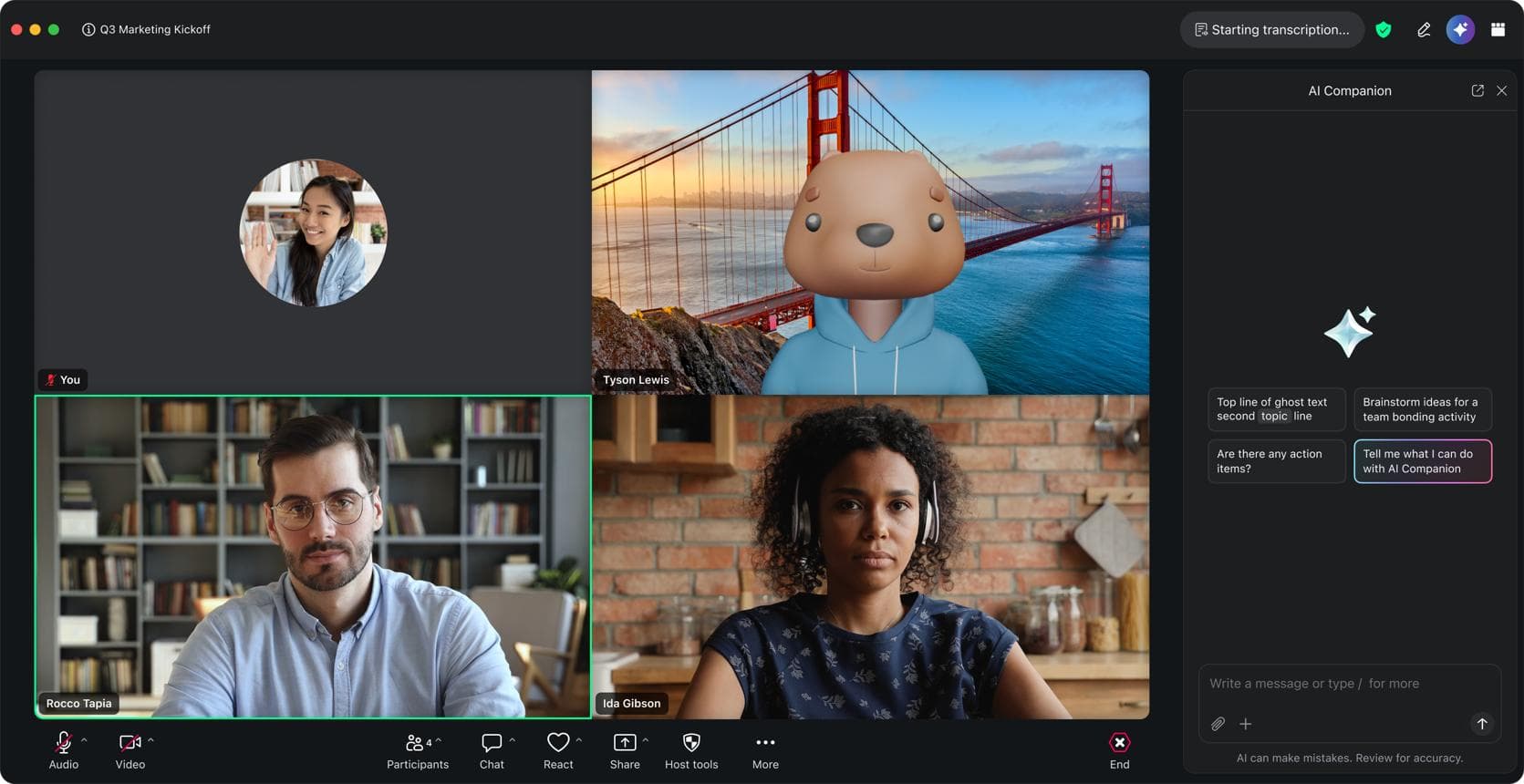
The company’s AI expansion over the last few years reflects that shift. Instead of acting like a passive video platform, Zoom now behaves more like an intelligent meeting layer sitting quietly underneath conversations listening, organizing, translating, summarizing, filtering noise, and occasionally rescuing teams from their own chaos.
Some of these tools are subtle. Others are almost unsettlingly efficient the first time you use them. Miss a meeting and the AI hands you a personalized recap before you even ask. Mention a deadline casually during a discussion and a task appears in your project software fifteen seconds later.
It doesn’t feel futuristic anymore. That’s probably the point.
Early Zoom succeeded because it made video meetings simple when everything else felt clunky. But simplicity alone wasn’t enough once remote and hybrid work became permanent infrastructure for companies.
By 2026, Zoom’s strategy has shifted toward AI-assisted collaboration rather than video conferencing itself. Meetings are only one layer now.
The platform’s AI system stretches across chat, scheduling, webinars, whiteboards, customer support tools, enterprise phone systems, and workflow automation. It’s all connected. Quietly.
That integration matters because modern meetings rarely begin and end inside a single call. Decisions spill into Slack. Tasks move into Jira. Follow-ups land in email threads nobody reads carefully enough.
Zoom’s AI now tries to stitch those fragmented moments together.
The feature most businesses talk about in 2026 isn’t the video quality. It’s the AI Meeting Companion.
And honestly, after using it for a while, you understand why.
The assistant listens during meetings in real time and creates surprisingly readable summaries. Not robotic transcripts stuffed with filler words. Actual summaries with structure, priorities, and context.
That alone saves teams hours every week. But the more interesting part is how contextual the system has become.
If an executive misses a meeting, the AI emphasizes strategic decisions and financial concerns. Engineers receive technical discussion points instead. Sales reps see customer-related updates first.
The summaries aren’t generic anymore. They adapt to the person reading them.
Then there’s task detection.
Somebody casually says, “I’ll revise the deck by Thursday,” and Zoom automatically converts it into a task linked with project management tools. No manual entry. No awkward “Can someone write that down?” interruptions.
It sounds small until you realize how much workplace friction comes from tiny forgotten commitments.
The smartest meeting tools in 2026 aren’t replacing conversations. They’re removing the administrative drag around them.
Global teams have always struggled with language gaps, even when everyone technically speaks the same business language.
Nuance disappears. Fast speakers dominate conversations. Regional accents confuse transcription systems. Technical vocabulary gets mangled.
Zoom’s AI translation engine in 2026 is noticeably better at handling these real-world messes.
Live subtitles now feel almost immediate. Chat translations happen naturally enough that multilingual discussions flow without constant pauses. In some cases, voice translation can preserve tone surprisingly well which matters more than people realize during negotiations or client calls.
A lot of companies underestimated how much mental energy employees spend trying not to misunderstand each other.
AI translation reduced that fatigue more than many expected.
Remote work introduced everyone to the soundtrack of modern life: barking dogs, construction drilling, mechanical keyboards, espresso machines, leaf blowers outside apartment windows.
Early noise cancellation tools handled some of it. Barely.
Zoom’s AI audio systems now isolate voices with far more precision using deep learning models trained specifically for speech separation. You notice it immediately in crowded environments.
Someone can be sitting in a noisy café and still sound oddly studio-like.
The platform also smooths inconsistent microphone levels automatically. Soft speakers become easier to hear without blasting everyone else’s audio.
Small detail. Huge difference over a full workday.
Hybrid conference rooms benefit too. Spatial audio positioning helps conversations feel less flat and chaotic when multiple people are speaking from a shared room.
You stop fighting the technology and start focusing on the discussion itself. That’s the real improvement.
A few years ago, AI video features felt gimmicky. Cartoon avatars. Strange filters. Distracting effects nobody used after the novelty wore off.
The 2026 approach is different.
Zoom’s visual AI mostly works in the background now. Automatic framing keeps presenters centered naturally when moving around. Eye contact correction subtly adjusts gaze alignment so conversations feel less disconnected.
And the low-bandwidth optimization deserves more attention than it gets.
In regions with unstable internet speeds, Zoom’s AI selectively preserves facial clarity and speech synchronization while reducing less important visual data. Meetings stay usable even under rough network conditions.
That matters globally. A lot.
This is where things become a little more complicated.
Zoom’s AI analytics tools can now track participation patterns, speaking time, engagement levels, response behaviors, and conversational dynamics across meetings.
For managers, the insights can be genuinely useful. Teams often discover they’re holding too many large meetings where only three people actually contribute. Some departments realize burnout spikes after late-afternoon calls stacked back-to-back.
The AI also analyzes tone and conversational sentiment during customer-facing meetings.
Sales teams use this heavily now. Support departments too.
A customer’s frustration signals can trigger recommendations in real time. Managers receive post-call summaries showing where conversations lost momentum or where objections repeatedly appeared.
Useful? Definitely.
A little uncomfortable at times? Also yes.
That tension around workplace AI monitoring hasn’t disappeared. Companies are still figuring out where productivity insight ends and over-surveillance begins.
For years, digital whiteboards sounded useful in theory but often turned into giant messy canvases nobody wanted to revisit later.
Zoom improved that experience by treating brainstorming sessions as structured information instead of visual chaos.
The AI can now organize related ideas automatically, convert rough sketches into polished diagrams, and generate meeting outlines from scattered notes.
You can scribble a rough workflow during a strategy session and the system rebuilds it into a readable process chart seconds later.
That sounds minor until you remember how much collaboration still happens through half-legible diagrams drawn under time pressure.
As AI tools improved, so did AI-driven threats.
Deepfake impersonation attempts became a serious concern for enterprise communication platforms heading into 2026. Zoom responded by embedding AI-based threat monitoring directly into meeting infrastructure.
The system now flags suspicious access patterns, abnormal behavior, identity inconsistencies, and potential spoofing attempts in real time.
Enterprise administrators can automate meeting locks, regional compliance policies, and identity verification processes based on risk levels.
None of this is especially glamorous. But it matters more than virtual backgrounds ever did.
One challenge companies still underestimate is how uneven hybrid meetings can feel.
People inside conference rooms naturally dominate conversations while remote participants drift toward the edges. It happens almost automatically.
Zoom’s AI room systems now attempt to correct that imbalance through speaker tracking, intelligent framing, and voice isolation.
Remote employees appear more prominently when speaking. Audio balancing reduces the “conference room echo” problem that used to make remote attendees feel disconnected.
It’s not perfect. Hybrid work still has awkward moments. But the technology has become noticeably less biased toward whoever happens to be physically present.
Education platforms rely heavily on transcription and live tutoring assistance. Universities now generate searchable lecture archives automatically, which students quietly love during exam season.
Healthcare organizations use AI-generated clinical summaries during telehealth sessions, though privacy oversight remains intense there for obvious reasons.
Customer support teams lean into sentiment analysis and live coaching prompts during difficult conversations. Sales organizations obsess over objection tracking and post-meeting deal insights.
The interesting part is that the same underlying AI infrastructure adapts differently depending on context.
That flexibility is probably why Zoom’s AI ecosystem expanded so quickly across industries.
This might sound contradictory after everything above, but most employees don’t actually want meetings flooded with visible AI features.
What they want is relief.
Relief from repetitive admin work. Relief from constantly taking notes while trying to participate. Relief from scheduling chaos and endless follow-ups and conversations that somehow produce no clear outcome.
That’s where Zoom’s 2026 AI strategy feels smarter than many competitors. The platform isn’t trying to replace human interaction. It’s trying to remove the friction surrounding it.
At least for now.
And honestly, after years of exhausting remote work habits, even small reductions in cognitive load feel surprisingly significant.
Ethnic Koti Editorial Team. (2026). "How Zoom’s AI Quietly Changed Virtual Meetings in 2026". Ethnickoti Blog. Retrieved from https://ethnickoti.com/blog/how-zoom-ai-improves-virtual-meetings-2026
Join the conversation. Be respectful and helpful.