WhatsApp|10 minutes Read
How to Lock WhatsApp Chats in 2026 for Real Privacy
Ethnickoti

Most people don’t think about WhatsApp privacy until somebody glances at their screen at exactly the wrong moment.
A message preview pops up during a meeting. A friend borrows your phone to make a call. Someone scrolling through photos accidentally taps into a conversation that wasn’t meant for anyone else.
Tiny moments. Still uncomfortable.
WhatsApp’s chat locking tools have become much better over the last couple of years, quietly evolving from a simple app lock into something closer to layered privacy protection. You can now hide individual chats, lock the app itself, remove message previews, and even make locked conversations invisible unless you know a secret code.
And honestly, a lot of people still haven’t explored half of these settings.
This guide breaks down how WhatsApp chat locking actually works in 2026, how to set it up properly on Android and iPhone, and the small privacy mistakes that quietly expose more information than users realize.
A lot of people assume Chat Lock simply adds a password to conversations. It’s more nuanced than that now.
When a chat is locked, WhatsApp can:
Hide the conversation inside a protected folder
Require fingerprint or Face ID authentication
Reduce notification exposure
Protect attached photos and media previews
That matters because privacy leaks rarely happen through dramatic hacks. Usually it’s ordinary stuff. Someone sees a banner notification. A lock screen preview reveals a name. A curious relative taps the wrong chat.
Modern phone privacy is mostly about reducing accidental exposure.
The built-in Chat Lock feature works similarly on Android and iPhone now, which is nice because WhatsApp settings used to feel wildly inconsistent across platforms.
Open WhatsApp
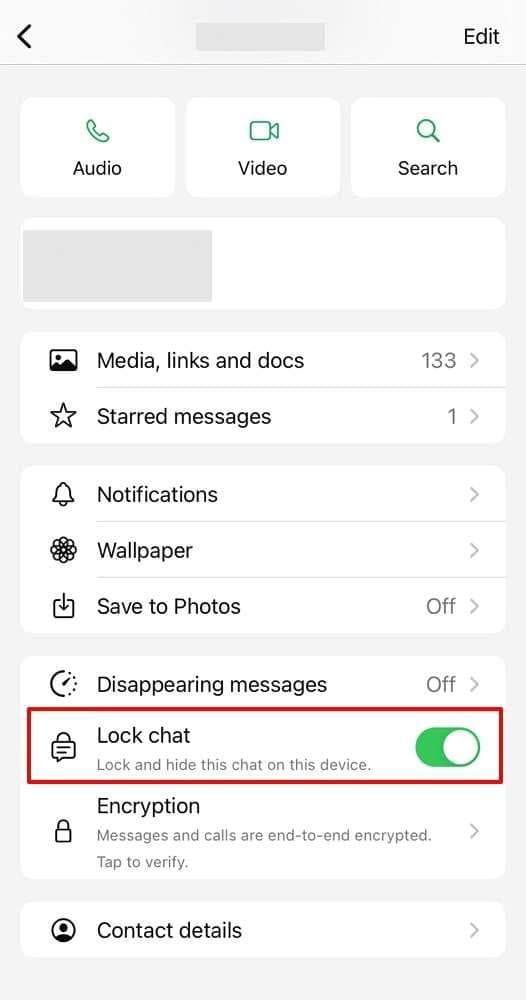
Select the conversation you want to protect
Tap the contact or group name at the top
Scroll down until you see Chat Lock
Enable the feature using fingerprint, Face ID, or device authentication
Once enabled, the chat moves into a separate Locked Chats folder.
At first, that folder can feel strangely dramatic. Like you’re hiding classified documents instead of a conversation about weekend plans or work gossip. But after using it for a while, it becomes surprisingly practical.
Especially for shared devices.
People sometimes enable Chat Lock and then immediately panic because the conversation “disappeared.”
It didn’t.
To open locked conversations:
Open WhatsApp
Pull down on the main chat screen
Open the Locked Chats section
Authenticate using Face ID, fingerprint, or passcode
It’s intentionally tucked away a little. Not impossible to find, but discreet enough that someone casually borrowing your phone probably won’t notice it immediately.
This is the feature that pushed WhatsApp privacy from “basic protection” into something much more serious.
Newer versions of WhatsApp let you completely hide the Locked Chats folder itself using a custom secret code.
Meaning someone could open your WhatsApp and never even realize protected chats exist.
Open Locked Chats
Go into Chat Lock settings
Select Secret Code
Create a custom code phrase
After setup, the Locked Chats folder disappears from the interface.
To reveal it again, you type the secret code into WhatsApp search.
Honestly, it’s one of the smartest privacy additions WhatsApp has released in years because it protects against curiosity, not just theft.
A surprising number of people only lock individual chats while leaving the entire app wide open.
That’s a little like locking one drawer in a house with the front door unlocked.
WhatsApp also supports full app authentication using biometrics or passcodes.
WhatsApp → Settings → Privacy → App Lock
WhatsApp → Settings → Privacy → Screen Lock
You can usually configure:
Face ID
Fingerprint unlock
Automatic lock timers
The automatic timer matters more than people realize. If your phone stays unlocked for long periods, someone only needs a few seconds to open everything.
Samsung phones quietly offer one of the strongest WhatsApp privacy setups available through Secure Folder.
A lot of users never touch it because it sounds overly technical. It really isn’t.
It creates a separate encrypted environment protected by Samsung Knox security.
You can install a second WhatsApp instance inside it, hidden from the normal phone environment.
That setup is genuinely useful for:
Separating work and personal conversations
Keeping private accounts discreet
Extra protection on shared devices
Honestly, Samsung’s privacy ecosystem is underrated.
Here’s the awkward truth: many people spend time locking chats while leaving full message previews visible on their lock screen.
Which defeats half the purpose.
A locked conversation doesn’t matter much if incoming messages still display publicly.
Go to:
Settings → Notifications → Lock Screen
Then hide sensitive content.
Settings → Notifications → WhatsApp → Show Previews → Never
That single setting dramatically improves real-world privacy.
This misunderstanding still refuses to die.
Archiving chats only hides them from the main conversation list. It does not password-protect anything.
Someone can open archived chats in seconds.
That said, archiving still has value. Combined with Chat Lock, it adds another small layer of obscurity and reduces clutter on the main screen.
Just don’t mistake organization for security.
People still use birthdays and repeating numbers as security codes in 2026. Which is kind of amazing when you think about it.
If your device supports fingerprint or Face ID, use them.
Recommended setup:
Fingerprint authentication
Face ID
Strong device passcode backup
Avoid:
1234
0000
Birth years
Simple repeating patterns
A weak passcode quietly undermines every other privacy setting.
Here’s something many people overlook: locked chats don’t help much if your backups remain unencrypted.
WhatsApp now supports end-to-end encrypted backups, and enabling them is worth the extra step.
You can enable it through:
WhatsApp → Settings → Chats → Chat Backup → End-to-End Encrypted Backup
Once active, backups require your password or recovery key for restoration.
Which also means you should store that password carefully. People forget backup credentials surprisingly often.
Privacy features inside WhatsApp evolve constantly now. Small updates quietly add meaningful protections.
Recent versions introduced:
Secret Code support
Improved notification hiding
Better biometric handling
Enhanced backup encryption tools
A lot of users skip updates for months and never realize newer privacy controls are sitting there waiting.
WhatsApp privacy used to be fairly basic. A simple app lock, maybe archived chats if you wanted less clutter. That was about it.
Now the platform offers layered protection that can genuinely make private conversations feel private again if you actually configure it properly.
The strongest setup usually looks something like this:
Lock important chats
Enable app-wide biometric protection
Hide notification previews
Use encrypted backups
Turn on Secret Code hiding
None of that makes you invisible online. But it does reduce the small everyday privacy leaks that most people experience far more often than dramatic security breaches.
And honestly, that’s usually the real goal.
Ethnic Koti Editorial Team. (2026). "How to Lock WhatsApp Chats in 2026 for Real Privacy". Ethnickoti Blog. Retrieved from https://ethnickoti.com/blog/how-to-lock-whatsapp-chats-2026
Join the conversation. Be respectful and helpful.