WhatsApp|10 minutes Read
How to Hide Your Online Status on WhatsApp Without Looking Suspicious
Ethnickoti

There’s a strange pressure that comes with WhatsApp now. People notice when you’re online. They notice when you read a message and don’t reply. Sometimes they notice a little too much.
A quick late-night check of a group chat suddenly turns into, “I saw you were active.” You open the app to look up an address someone sent three days ago, and somehow that becomes social evidence you were ignoring another conversation.
Most people don’t want to disappear from WhatsApp completely. They just want breathing room. Quiet access. A little privacy without drama attached to it.
Thankfully, WhatsApp’s privacy controls have become much more flexible over the last couple of years. The settings are no longer buried in weird menus either. If you know where to look, you can hide your online status, limit your visibility, reduce tracking behavior from contacts, and make the app feel significantly less intrusive.
Some settings matter more than others though. And a few come with trade-offs people don’t realize until later.
Before changing privacy settings, it helps to understand what other people can normally track on WhatsApp.
By default, the app may show:
Your online activity
Last seen timestamp
Read receipts (blue ticks)
Profile photo visibility
Status updates
Typing and recording indicators
Most users only think about the “online” label. But honestly, the combination of all these signals is what creates that constantly observed feeling.
And once you start adjusting them, the app suddenly feels calmer. Less performative.
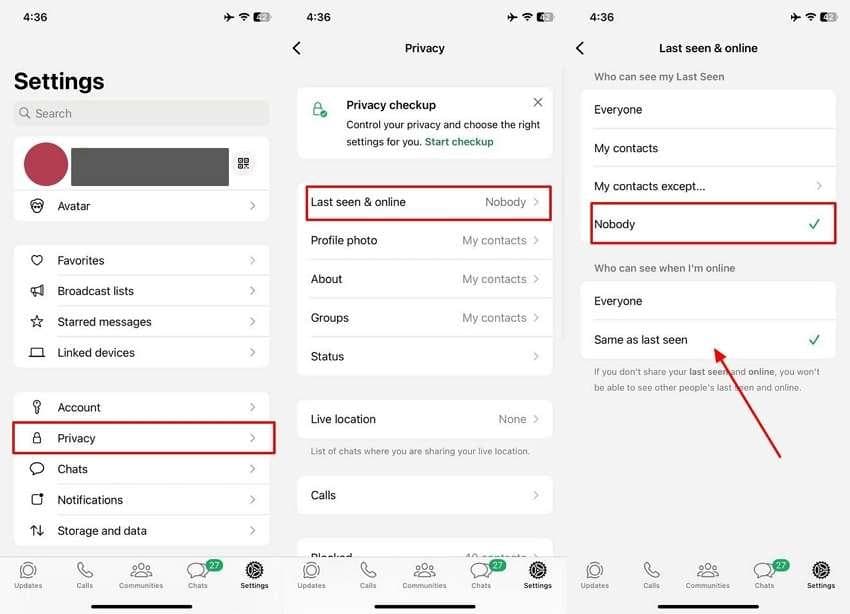
The actual setting is straightforward now. Android and iPhone use almost the same steps.
Open WhatsApp
Go to Settings
Tap Privacy
Open Last Seen & Online
You’ll see two separate controls.
One controls your last seen timestamp. The other controls your online visibility.
For most people, the best setup is:
Last Seen: Nobody
Online Status: Same as Last Seen
That combination removes your visible activity almost entirely from regular contacts.
One small thing people miss: if you hide your own online status, you also lose the ability to see other people’s last seen and online activity.
WhatsApp treats privacy as mutual. Fair enough, honestly.
This part gets interesting because privacy isn’t always about hiding from everyone.
Sometimes it’s just one person. Or a few.
Work colleagues. An ex. Extended family. That one friend who somehow notices every single timestamp.
WhatsApp quietly added more granular controls for exactly this reason.
Under the privacy menu, you can choose:
Everyone
My Contacts
My Contacts Except...
Nobody
“My Contacts Except…” is surprisingly useful because it avoids making your account look completely invisible to everyone.
A lot of people prefer subtle privacy rather than total blackout mode.
If online visibility stresses you out, read receipts are probably part of the problem too.
Those blue ticks changed messaging culture more than people admit. Suddenly every delayed reply felt intentional.
Turning them off is simple:
Settings
Privacy
Disable Read Receipts
There’s a catch though.
Once disabled, you also stop seeing other people’s read receipts. Some users love that. Others end up turning it back on within a week because they miss the feedback loop.
Human psychology is weird like that.
Not officially.
WhatsApp still doesn’t provide a direct setting to hide typing indicators or voice recording activity. If you’re actively inside a chat typing, the app generally shows it.
People have tried all sorts of workarounds over the years. Some actually help a little.
Quick replies from notification banners sometimes reduce visible activity indicators depending on the phone and OS version.
Some users type messages offline, then reconnect before sending. Clunky? A little. But it can reduce real-time visibility in certain situations.
Reading messages from lock-screen previews or notification trays lets you avoid opening conversations immediately.
Tiny habits like that make a bigger difference than people expect.
A surprising number of spam contacts and unknown numbers gather information just from profile photos.
Especially if your phone number is public somewhere online.
Restricting profile visibility is smart even if you’re not particularly privacy-focused.
Go to:
Settings
Privacy
Profile Photo
Then switch visibility to:
My Contacts
or My Contacts Except...
It’s a small privacy upgrade. Quiet, but worthwhile.
This is where many people accidentally undermine all their privacy settings.
You hide online status... but your lock screen still flashes full message previews every five minutes.
At that point, anyone near your phone can still see incoming conversations.
On Android, look for:
Settings
Notifications
Hide Sensitive Content
On iPhone:
Settings
Notifications
Show Previews → Never
Honestly, this might be one of the most underrated privacy settings on any phone.
WhatsApp’s Chat Lock feature became surprisingly polished after its earlier versions felt half-finished.
Now you can protect specific conversations using:
Fingerprint authentication
Face ID
Passcode verification
Locked chats move into a protected folder, and notifications become more discreet automatically.
For people sharing devices occasionally with family members or partners, this matters more than hiding online status.
Not every privacy concern comes from strangers.
Search online for WhatsApp privacy tricks and you’ll immediately run into apps promising things like:
Freeze last seen
Ghost mode
Invisible online access
Secret tracking tools
Most are sketchy. Some are outright dangerous.
A lot of them request excessive permissions, attempt account access, or violate WhatsApp policies entirely.
If an app asks for your login verification code or claims it can spy on others silently, close it immediately.
The official privacy settings already cover most legitimate needs.
After testing different combinations over time, many users settle into a setup that feels private without becoming socially awkward.
Last Seen → Nobody
Online Status → Same as Last Seen
Read Receipts → Off
Profile Photo → My Contacts
Status Updates → My Contacts Except...
Notification Previews → Hidden
That setup removes most unnecessary visibility while still keeping the app usable and normal.
No weird third-party hacks required.
People often frame WhatsApp privacy as secrecy. Usually it’s not that dramatic.
Most users simply want less social pressure attached to messaging. Less obligation to perform availability every time the app opens.
And honestly, the newer privacy controls do a pretty good job once they’re configured properly.
Hide your online status. Restrict read receipts if you want. Tighten notification previews. Use chat lock for conversations that deserve another layer of privacy.
The goal isn’t to disappear. Just to regain a little control over when people can observe your attention.
Ethnic Koti Editorial Team. (2026). "How to Hide Your Online Status on WhatsApp Without Looking Suspicious". Ethnickoti Blog. Retrieved from https://ethnickoti.com/blog/hide-online-status-whatsapp-guide-2026
Join the conversation. Be respectful and helpful.