Messenger|9 minutes Read
What Happens When You Restrict Someone on Facebook Messenger? The Quietest Way to Create Distance Online
Ethnickoti

There’s a strange kind of stress that comes from opening Messenger and seeing a name you really didn’t want to deal with that day.
Not necessarily someone dangerous. Sometimes it’s just exhausting people. The person who keeps checking in every few hours. An old friend who turned passive-aggressive after a fallout. A distant relative who sends conspiracy videos at 2 a.m. Or maybe an ex who hasn’t technically crossed a line, but every notification from them still hits like a tiny emotional setback.
Blocking feels dramatic. Muting doesn’t always go far enough.
That middle ground is exactly why Facebook added the Restrict feature inside Messenger. And honestly, it’s one of the platform’s more quietly useful tools.
The tricky part is that Facebook doesn’t explain it particularly well. A lot of people assume restricting someone works like blocking. It doesn’t. Others think the other person gets notified. They won’t.
So what actually changes after you restrict someone on Messenger?
Restricting someone quietly limits how they interact with you on Messenger without fully cutting them off.
The biggest thing to understand is this: the other person usually has no obvious clue it happened.
Their messages still go through. They can still send memes, voice notes, awkward “hey” texts after six months of silence all of it. But Messenger stops placing those conversations front and center in your inbox.
The conversation gets moved away from your regular chats, and Facebook strips away a lot of visibility between both users.
It’s less like slamming a door and more like quietly stepping into another room.
You stop receiving message notifications from them.
Messenger won’t ring if they call you.
Their chat disappears from your main inbox.
They cannot see when you’re active online.
They also won’t know if you’ve read their messages.
That last one matters more than people realize.
Read receipts create weird social pressure. You open a message accidentally, suddenly someone expects a response within minutes. Restricting removes that little psychological contract entirely.
And for a lot of people, that’s the whole point.
Not directly.
Facebook doesn’t send alerts saying, “You’ve been restricted.” There’s no notification. No warning banner. No dramatic message.
From their perspective, everything can appear fairly normal at first.
Still, people sometimes notice subtle signs over time.
Your active status disappears. Messages remain unread for unusually long periods. Calls stop getting answered entirely.
Some users eventually piece it together. Others never do.
That ambiguity is intentional. Facebook designed Restrict for situations where users want distance without escalation.
Because let’s be honest blocking somebody can sometimes create more conflict than the original problem.
People mix these up constantly.
Blocking is absolute. Restricting is selective distance.
If you block someone on Messenger:
They can’t message you.
They can’t call you.
In some cases, they can’t interact with your Facebook profile normally either.
Blocking tends to be obvious. Restricting isn’t.
There’s a social nuance here people don’t always talk about. A restriction often says:
“I don’t want constant access to me anymore.”
Blocking usually says:
“I don’t want contact at all.”
Different situations call for different boundaries.
And honestly? Social media has made boundary-setting weirdly complicated.
The old conversation doesn’t disappear permanently.
Messenger simply moves it out of your primary chat area. You can still access the conversation manually if you want to check messages later.
This becomes surprisingly useful in emotionally messy situations.
Sometimes you don’t want to erase someone entirely. You just don’t want their messages interrupting your day every few hours.
Restriction lets you control when or whether you engage.
That distinction matters.
Yes, unless you separately change your Facebook privacy settings.
Messenger restrictions mostly affect communication and visibility inside chats. It doesn’t automatically remove someone from your friends list or stop them from viewing public content.
That surprises some people.
You can restrict someone on Messenger while still technically remaining Facebook friends. A lot of users do exactly that because unfriending tends to create social tension especially among coworkers, family members, or shared friend circles.
It’s digital diplomacy, basically.
Facebook handles this part carefully.
If someone you restricted gets added to the same group chat as you, Messenger gives you a warning before you enter the conversation.
That sounds minor until it actually happens.
Shared group chats can get awkward fast, especially after personal conflicts. Facebook’s alert system gives users a chance to decide whether they still want to participate.
It’s one of those small platform details that quietly prevents unnecessary stress.
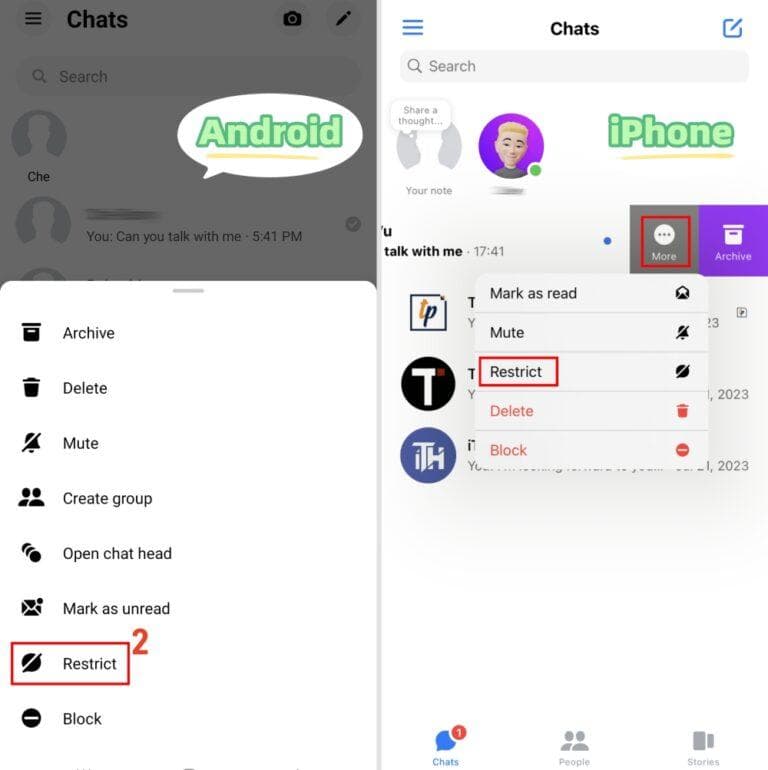
The process only takes a few seconds.
Open the Messenger app.
Go to your chats list.
Press and hold the person’s chat.
Tap Restrict.
Confirm your choice.
Done.
No alerts go out. No dramatic announcement. Messenger quietly updates the interaction settings in the background.
Open Messenger.
Tap the menu icon in the top corner.
Open Privacy & Safety.
Select Restricted Accounts.
Search for the person you want to restrict.
Add them to the restricted list.
Some users prefer this method because it’s easier to manage multiple restricted accounts in one place.
Absolutely.
Restriction isn’t permanent. You can unrestrict someone anytime through the same settings menu or directly from the chat.
And honestly, people do change their minds.
Relationships cool down. Arguments settle. Sometimes restricting someone is less about punishment and more about needing temporary breathing room.
Social apps rarely encourage healthy pacing in communication. Features like this quietly help restore some of it.
There’s been a noticeable shift in how people handle online boundaries.
A few years ago, blocking was the standard reaction to uncomfortable interactions. Now people often want something softer. Less confrontational. More controlled.
Restriction fits modern social dynamics surprisingly well because real relationships are messy.
You might still share mutual friends. You may work together. Maybe it’s family. Maybe it’s someone you simply don’t have the emotional energy for anymore.
Not every situation needs a digital scorched-earth response.
Sometimes silence or reduced visibility is enough.
Yes. Their messages still go through, but they won’t appear normally in your active inbox, and you won’t receive notifications for them.
No. Restricting only changes Messenger interactions. Unless you manually unfriend or block them, they can still remain on your friends list.
No. Messenger hides your active status from restricted users, which is one of the feature’s biggest privacy benefits.
The chat history remains intact. Messenger simply moves the conversation away from your main inbox and limits interaction visibility.
That depends on the situation. Restricting works well when you want space without creating obvious conflict. Blocking is usually better for harassment, safety concerns, or situations where you want zero contact.
Ethnic Koti Editorial Team. (2026). "What Happens When You Restrict Someone on Facebook Messenger? The Quietest Way to Create Distance Online". Ethnickoti Blog. Retrieved from https://ethnickoti.com/blog/what-happens-when-you-restrict-someone-on-facebook-messenger
Join the conversation. Be respectful and helpful.