Discord|9 minutes Read
How to Make Discord GIFs That Actually Feel Personal
Ethnickoti

Some Discord servers feel alive. Not because people are constantly typing, but because the conversations have texture. Inside jokes. Weird reaction GIFs. Tiny looping clips that somehow become part of the server’s personality after a week.
And honestly, that’s where custom GIFs come in.
Anybody can spam a random dancing cat from Tenor. But making your own Discord GIF? Different energy entirely. It turns regular chats into something more recognizable your humor, your references, your people.
The good news is you don’t need editing software that looks like a spaceship dashboard. Most GIFs people use on Discord are surprisingly simple to create once you know where the buttons are hiding.
Discord moves fast. A message can disappear under twenty replies in less than a minute if your server is active enough. GIFs cut through that noise almost instantly.
There’s also something oddly social about them. A custom GIF feels less disposable than a meme image. People start recognizing who made it. Friends start reusing it. Sometimes one stupid five-second loop becomes server lore for months.
You’ve probably seen this happen already. Someone clips a streamer raging during a game. Another person adds text. Suddenly it’s the default reaction whenever matchmaking goes horribly wrong.
That’s basically the whole appeal.
Discord already supports animated GIFs in several ways, though the process changes depending on what you’re trying to do.
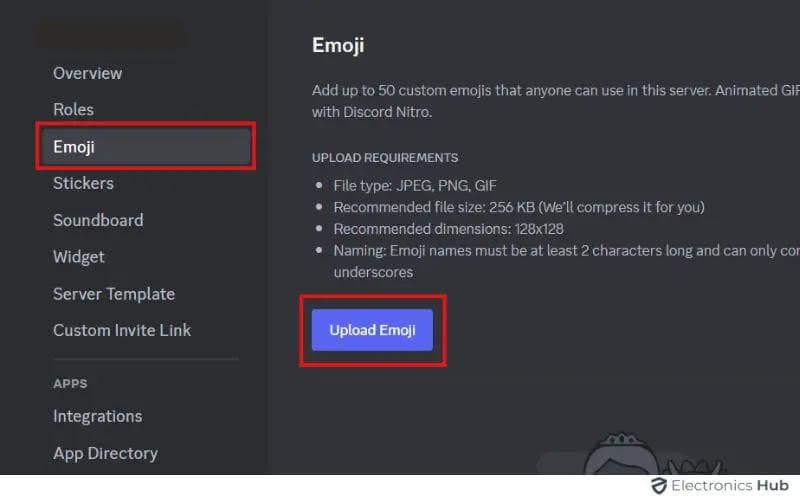
If you want to upload a GIF as a custom server emoji or sticker-style reaction, here’s the straightforward route.
Open your Discord server.
Click the server name in the upper-left corner.
Head into Server Settings.
Find the Emoji section.
Choose Upload Emoji.
Select your animated GIF file.
That’s it. Mostly.
There’s one catch people run into constantly: animated emoji uploads usually require Discord Nitro boosts on the server. So if the upload fails even though the file looks fine, it may not actually be your GIF causing the problem.
Discord can be annoyingly vague about that.
A lot of Discord users create rough GIFs by screen recording random clips and converting them online. Which works. Sort of.
But if you want cleaner results smoother loops, captions, effects, decent cropping GIPHY is still one of the easiest tools around.
You don’t even need editing experience. The interface is surprisingly forgiving.
Visit the GIPHY website and log into your account.
Click the Create button.
Upload a video or image sequence.
Trim the clip down. Shorter loops almost always work better on Discord.
Add text, stickers, or effects if you want.
Export and upload the finished GIF.
One small thing people underestimate: timing.
A GIF that drags for ten seconds usually dies in chat. Two or three seconds? Much funnier. There’s a reason reaction GIFs loop aggressively fast. Your brain processes them almost instantly while scrolling.
The shorter the joke, the more people reuse it.
Sometimes the GIF itself isn’t enough. You need text on top of it. Preferably something unhinged.
Discord bots make this ridiculously easy now.
One of the more popular options is esmBOT, which lets you add captions without leaving Discord entirely.
Open your server settings.
Go to the App Directory.
Search for esmBOT.
Add it to your server.
Use the /caption command inside chat.
After that, you can paste a GIF link and overlay custom text directly on the animation.
This is where Discord humor gets weirdly creative. Half the funniest GIFs aren’t professionally edited at all. They’re just badly timed captions layered over chaotic clips at 2 AM.
Which, honestly, is part of the charm.
This part matters more than software.
Most custom GIFs fail because they try too hard. Too much text. Too many effects. The joke gets buried under editing.
The best Discord GIFs usually do one thing well.
A strong reaction face
One absurd caption
A perfectly timed loop
Something weirdly relatable
That’s enough.
There’s also a very specific kind of Discord comedy where low-quality edits somehow become funnier because they look rushed. Clean production isn’t always the goal here.
A blurry GIF with perfect timing will beat a polished one almost every time.
If you’re running out of ideas, the internet basically hands you raw material every hour.
Some of the best places to grab clips:
Twitch stream fails
Anime reaction scenes
Sports reactions
Old Vine compilations
TikTok clips
Your own game recordings
Personal clips usually hit hardest, though. Friends losing their minds during ranked matches. Somebody accidentally muting themselves during an argument. Those moments land because people recognize the context instantly.
That’s the difference between a generic meme and a server-specific GIF people spam for months.
Discord has upload limits, and GIFs can get heavy surprisingly fast.
Especially if you export them in high resolution.
If your GIF refuses to upload, try:
Reducing the resolution
Shortening the clip duration
Removing unnecessary frames
Compressing the file through online tools
Discord Nitro helps here because it increases upload limits significantly. If you send GIFs constantly, Nitro honestly becomes less of a cosmetic subscription and more of a convenience upgrade.
Not essential. Just noticeably easier.
Some things look funny in your editing window and somehow die the moment they hit Discord chat.
Nobody wants to pause and read a paragraph inside a reaction GIF.
Keep captions short enough to understand instantly.
Flashing transitions, giant stickers, zoom spam it gets exhausting quickly.
Simple loops age better.
Five seconds already feels long in Discord chat. Anything beyond that usually loses momentum unless the clip itself is exceptional.
People overthink this part.
A good GIF usually isn’t about editing skill. It’s about timing and observation. Catching the exact frame where somebody’s expression says everything. Pairing a dramatic anime scene with an extremely mundane caption. Tiny contrasts like that work because Discord humor tends to thrive on exaggeration mixed with familiarity.
And honestly? The more specific the GIF feels to your server culture, the funnier it becomes.
That’s why random inside-joke GIFs often outperform professionally made memes.
Making Discord GIFs is one of those things that sounds more technical than it really is.
Most people start with a random clip, add one dumb caption, send it once as a joke… and suddenly the whole server keeps reposting it for weeks.
That’s usually how it starts.
You don’t need professional editing software. You don’t need design skills. Half the time, rough edits are funnier anyway.
Just experiment a little. Clip moments from games. Try captions that feel absurdly specific. Keep the loops short. Save the ones that make your friends immediately spam reactions back.
That’s basically the entire formula.
Ethnic Koti Editorial Team. (2026). "How to Make Discord GIFs That Actually Feel Personal". Ethnickoti Blog. Retrieved from https://ethnickoti.com/blog/how-to-make-discord-gifs
Join the conversation. Be respectful and helpful.