Reddit|9 minutes Read
How to Make a Subreddit Private and Control Who Gets Access
Ethnickoti

Running a subreddit feels a little different once the community starts growing. At first, it’s just a few people posting memes, sharing advice, or arguing over oddly specific topics at 2 AM. Then suddenly strangers show up. Spam creeps in. Screenshots get reposted elsewhere. The vibe changes.
That’s usually the moment moderators start thinking about privacy.
Maybe you want a smaller invite-only space. Maybe the subreddit is for a private team, a niche hobby circle, or a support group where people shouldn’t feel exposed. Reddit gives moderators a way to lock things down without deleting the community entirely, and honestly, the process is simpler than most people expect.
Still, there are a few details worth understanding before you flip the switch. A private subreddit works differently from a restricted one, and Reddit’s settings menu isn’t exactly famous for being intuitive.
Here’s how to make your subreddit private properly, what changes after you do it, and how to manage approvals without turning moderation into a full-time job.
Before changing anything, it helps to know what “private” actually means on Reddit.
A private subreddit completely hides its content from anyone who hasn’t been approved by the moderators. Posts, comments, usernames, media uploads everything disappears behind a permission wall.
If someone tries visiting the subreddit without approval, they’ll see a message saying the community is private and inaccessible.
That’s very different from a restricted subreddit.
Restricted communities still allow public viewing in most cases. Users just can’t post unless moderators approve them. Private communities remove visibility entirely.
And yes, search engines stop indexing most of the content too. Which is often the point.
Quick reality check: Existing members won’t automatically become approved users when you switch to private. You may need to manually manage access depending on your setup.
You’ll need moderator permissions to change community privacy settings. This can’t be done by regular members.
The desktop browser version of Reddit is still the easiest place to handle moderation tools. Mobile works for some tasks, but settings occasionally move around depending on app updates.
Open Reddit in your browser and sign into the account that manages the subreddit.
If you moderate multiple communities, double-check you’re switching the correct one. Sounds obvious. People still accidentally edit the wrong subreddit more often than you’d think.
Click your profile icon and head into the subreddit you want to change.
Once you’re inside the community page, look toward the right-hand sidebar for the moderator controls.
Click Mod Tools.
Reddit’s moderation panel contains a ridiculous number of options now, so don’t get distracted by automations, queues, traffic stats, and user logs unless you actually need them.
For this process, you only need the community settings section.
In the left sidebar, scroll down until you see General Settings or Community Settings. Reddit changes labels from time to time, but the option usually lives in the same area.
Open it.
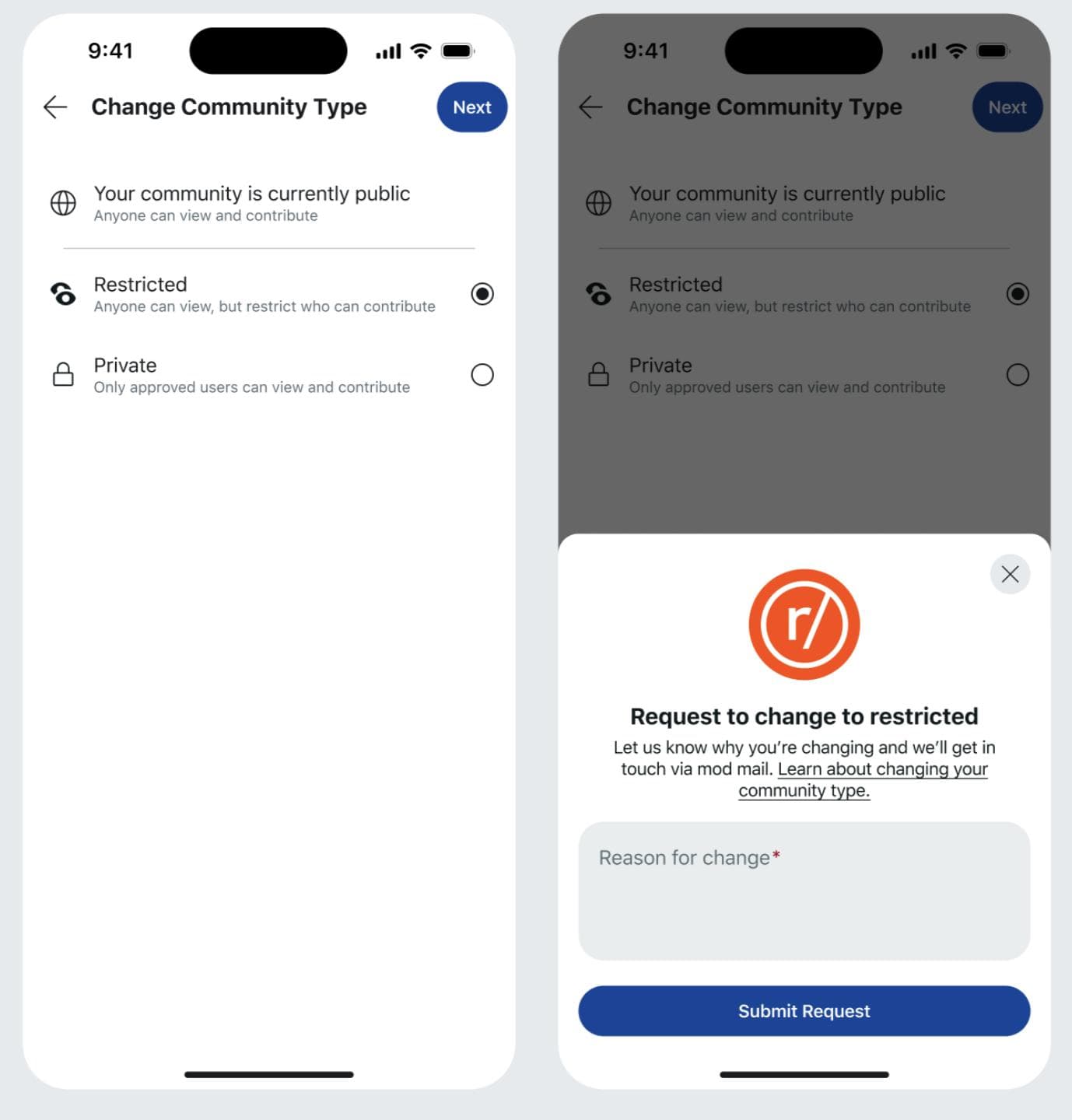
Find the section labeled Type of Community.
You’ll usually see three options:
Public anyone can view and participate
Restricted public viewing, limited posting
Private only approved users can access
Select Private.
Scroll down and click Save Changes.
That’s it. The subreddit is now private.
Well. Technically.
You’ll still want to test everything yourself afterward because Reddit occasionally caches pages strangely for logged-in moderators.
This part matters more than people realize.
Moderators sometimes assume the privacy settings worked immediately, but they’re still viewing the subreddit normally because they’re logged in with mod permissions.
Here’s the easy way to verify everything:
Log out of Reddit completely
Or open an incognito/private browsing tab
Visit your subreddit URL manually
If the privacy settings worked correctly, you should see a restricted access message instead of posts and comments.
Some moderators also ask a friend who isn’t approved to test access from another account. Probably overkill for casual communities, but useful if privacy genuinely matters.
Once your subreddit goes private, access management becomes part of moderation.
Which honestly can get annoying if the community grows quickly.
Still, approving users manually gives moderators a lot more control over spam, trolling, and low-effort participation.
Log into Reddit and open your subreddit
Click Mod Tools
Scroll to User Management
Select Approved Users
Click Approve User
Enter the Reddit username carefully
Save the change
That user can now access the subreddit normally.
And yes, usernames are case-sensitive enough to cause problems sometimes. Double-check spelling before assuming someone was approved.
A lot of communities never need private mode. Public subreddits work perfectly fine for memes, fandoms, gaming clips, and general discussion.
But there are situations where privacy changes everything.
People open up more when they know random strangers can’t endlessly lurk or screenshot conversations.
Mental health groups, addiction recovery spaces, grief communities these often work better when members feel protected.
Some organizations use Reddit almost like an internal message board. It’s surprisingly common with gaming clans, crypto groups, writing circles, and niche online communities.
Not glamorous. But functional.
Occasionally a subreddit gets flooded after going viral somewhere else.
Moderators sometimes switch to private temporarily just to regain control. It’s messy, but it works.
There are a few side effects people don’t think about until after the subreddit becomes private.
A private subreddit doesn’t really benefit from Reddit discovery anymore.
New users can’t casually browse posts before joining, which means fewer spontaneous members.
That’s not necessarily bad. Just intentional.
Approving users manually sounds manageable until dozens of requests start arriving every week.
Small communities? Easy.
Large active ones? Different story.
If posts were previously indexed or shared elsewhere, outsiders clicking those links later won’t see the content anymore.
Sometimes users get confused and assume the subreddit was deleted entirely.
Yes. Reddit lets moderators switch between community types whenever needed.
You simply return to the same community settings page and choose Public or Restricted instead.
That said, changing privacy settings repeatedly can frustrate members. Especially if users suddenly lose access without warning.
A short announcement post before making the switch usually helps avoid confusion.
Privacy settings sound technical on paper, but they affect culture more than most moderators expect.
People behave differently when they know a space isn’t fully public. Conversations usually become calmer. Sometimes more honest. Occasionally weirder too, if we’re being fair.
Making a subreddit private won’t magically fix moderation issues or community drama. Reddit is still Reddit. But it does create boundaries, and boundaries tend to shape behavior online more than giant rule lists ever do.
If you manage a community that needs tighter control, the option is there. A few clicks, a couple approval settings, and suddenly the entire atmosphere changes.
Ethnic Koti Editorial Team. (2026). "How to Make a Subreddit Private and Control Who Gets Access". Ethnickoti Blog. Retrieved from https://ethnickoti.com/blog/how-to-make-a-subreddit-private
Join the conversation. Be respectful and helpful.