How To|9 minutes Read
How to Enable 2FA in Fortnite and Actually Keep Your Epic Games Account Safe
Ethnickoti

There’s a strange kind of panic that hits when you can’t log into your Fortnite account. Most players don’t think much about account security until something feels off a password suddenly stops working, V-Bucks disappear, or a rare skin vanishes from the locker like it was never there in the first place.
And honestly, some Fortnite accounts are worth protecting. People have spent years collecting cosmetics, battle pass rewards, crossover skins, event exclusives. A stacked locker isn’t just “game stuff” anymore. It’s time. Memories too, weirdly enough.
That’s exactly why Epic Games pushes players toward two-factor authentication, usually shortened to 2FA. It adds a second layer of security to your Epic account so even if somebody somehow gets your password, they still can’t get in without a verification code.
The setup takes maybe five minutes. Less if you already use an authenticator app.
2FA stands for two-factor authentication. The idea is simple: logging into your account requires two separate things.
First factor? Your password.
Second factor? Usually a temporary code sent to your phone, email, or authentication app.
Without that second code, access gets blocked. Even if somebody bought your leaked password off some shady database online.
Epic Games supports several 2FA methods, which is good because not everyone likes using the same security tools. Some players trust Google Authenticator. Others just want a quick code sent through email and call it a day.
No shame in either approach. Though one is definitely stronger.
The process happens through your Epic Games account settings, not inside Fortnite itself. That trips some people up the first time.
Open the Epic Games website and sign into your account.
Click your profile icon in the top-right corner.
Choose Account.
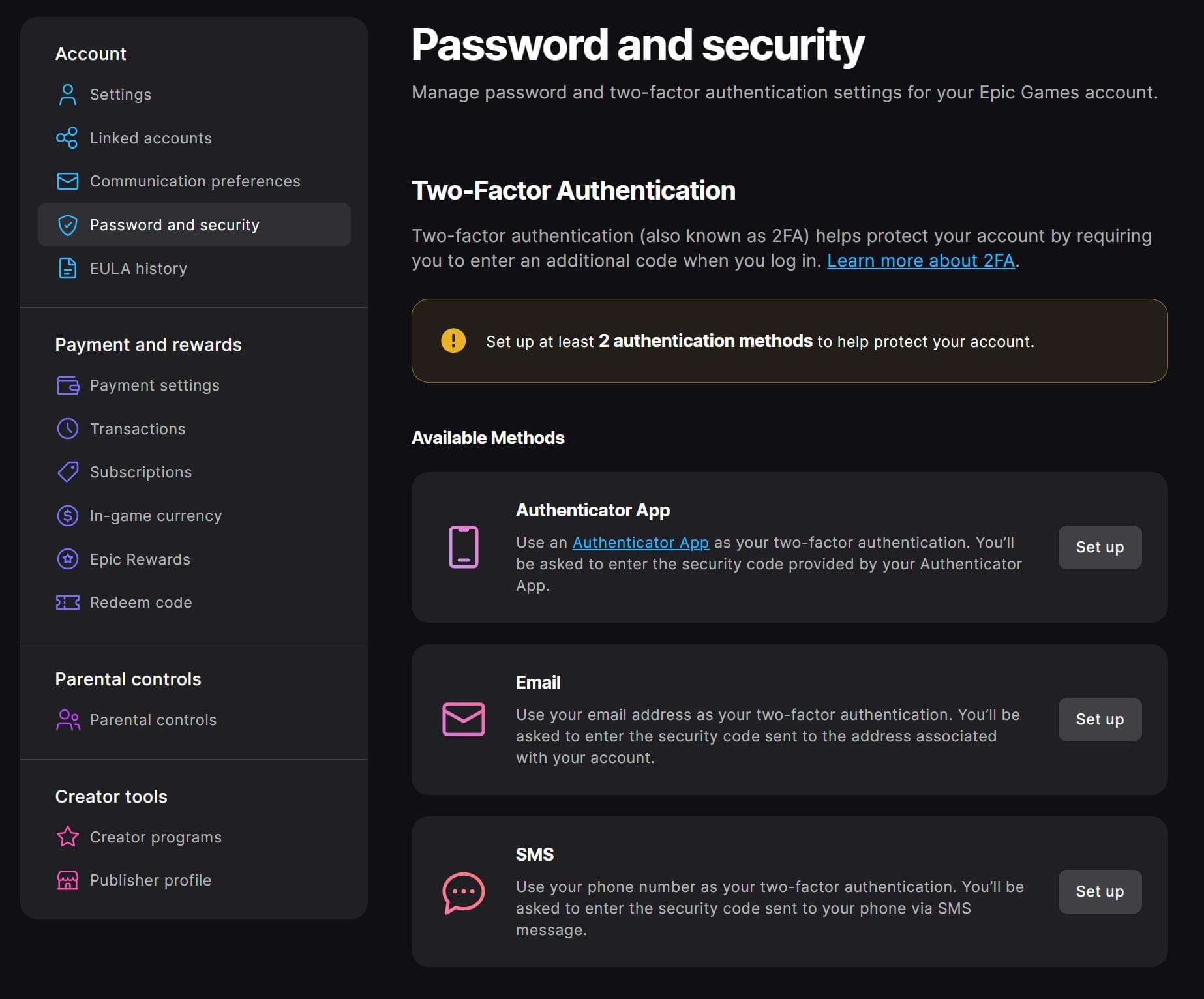
From the left-side menu, select Password & Security.
Scroll down until you see the Two-Factor Authentication section.
Pick one of the available methods and complete the setup instructions.
That’s basically it. Once activated, Epic will ask for a verification code whenever a login attempt looks unfamiliar or happens on a new device.
It sounds small. But it makes a massive difference.
This part matters more than people think. Not every 2FA method offers the same level of protection.
This is usually the best option.
Apps like Google Authenticator, Microsoft Authenticator, or Authy generate rotating six-digit login codes every few seconds. Since the codes live on your device instead of your inbox or SIM card, they’re much harder for attackers to intercept.
It takes maybe an extra ten seconds during setup. Worth it.
Especially if your Epic account is linked to payment methods.
This method sends a code directly to your registered email address whenever you log in.
It’s easier for casual players because there’s nothing extra to install. But there’s a catch people ignore: if your email account itself gets compromised, your Fortnite account can fall with it.
If you use email 2FA, make sure your email password is strong and protected too. Otherwise it’s kind of like locking your front door while leaving the windows open.
SMS sends login codes to your phone number through text messages.
Convenient? Definitely.
Perfectly secure? Not really.
SIM swap attacks are still a thing, though most regular players probably won’t be targeted that way. For everyday use, SMS is still far better than having no 2FA at all.
Because stolen Fortnite accounts are unbelievably common.
Not always through hacking, either. A lot of accounts get compromised because people reuse passwords across different websites. One old data breach somewhere else suddenly turns into a Fortnite problem months later.
A friend shares credentials with another friend. Somebody downloads a fake “skin unlocker.” Another person logs into a suspicious tournament website.
It happens quietly.
Then one day your locker looks different.
Most account theft starts with simple mistakes, not movie-style hacking.
That’s the uncomfortable truth.
Epic Games does something smart here. They reward players for taking security seriously.
Once 2FA is active on your account, you’ll receive the Boogie Down emote in Fortnite Battle Royale. It’s been around for years now, but people still recognize it instantly.
If you also own Fortnite Save the World, there are a few extra bonuses tied to 2FA:
50 Armory Slots
10 Backpack Slots
1 Legendary Troll Stash Llama
Not life-changing rewards, sure. But free cosmetics and inventory space for five minutes of setup? Hard to complain.
This part gets messy sometimes.
Check spam folders first. Seriously. Epic emails love disappearing into promotions tabs and junk folders for some reason.
If nothing shows up after a few minutes, try resending the code or confirming that your Epic account email address is still correct.
Usually this happens because your phone’s clock is slightly out of sync. Authenticator apps rely on accurate device time.
Turning on automatic date and time settings fixes it more often than people expect.
This is why backup codes matter.
When enabling 2FA, Epic may provide recovery options or backup codes. Save them somewhere safe not just buried inside screenshots on the same phone you might lose later.
People skip this step constantly. Then regret it six months later.
2FA is strong protection, but it’s not magic.
A couple extra habits make your account dramatically safer:
Don’t reuse passwords from other websites
Avoid “free V-Bucks” websites completely
Never share account access, even with friends
Keep your linked email account protected too
Use a password manager if remembering passwords drives you insane
That last one changed everything for a lot of people, honestly.
Most bad passwords happen because humans are tired and lazy. Which sounds harsh, but it’s true. Password managers remove that problem almost entirely.
Technically yes.
But some Fortnite features and events may require 2FA, especially tournaments, gifting systems, or competitive modes tied to Epic account security policies.
Epic has tightened those rules over the years because competitive accounts became huge targets for theft and fraud.
So while you can ignore 2FA, it slowly becomes more inconvenient not to use it.
A lot of security advice online feels dramatic. This one really isn’t.
Fortnite 2FA is one of those rare settings that’s genuinely worth enabling immediately. The setup is quick, the rewards are decent, and the protection it adds is very real.
Because recovering a stolen Epic Games account? That process can take days. Sometimes longer.
Five minutes today saves a ridiculous amount of stress later.
And if your locker contains old Battle Pass skins you can never get back again… yeah. Definitely turn it on.
No. Epic Games offers two-factor authentication completely free. You don’t need a subscription or special account type to enable it.
Authenticator apps are generally considered the safest choice because the verification codes stay tied to your device instead of traveling through email or SMS systems.
Yes, you can disable it anytime through your Epic Games account security settings. Though most players leave it enabled once they realize how little effort it takes.
Competitive modes often require extra account verification to reduce cheating, fraud, and account theft. It helps protect tournament integrity and player accounts at the same time.
Sometimes stolen items can be recovered through Epic Games support, but there’s never a guarantee the process will be fast or smooth. Preventing unauthorized access in the first place is far easier than trying to recover an account afterward.
Ethnic Koti Editorial Team. (2026). "How to Enable 2FA in Fortnite and Actually Keep Your Epic Games Account Safe". Ethnickoti Blog. Retrieved from https://ethnickoti.com/blog/how-to-enable-2fa-fortnite-epic-games
Join the conversation. Be respectful and helpful.